

Query Builder Overview
The Query Builder in App Builder allows you to visually define and manage data queries without writing code. It provides a simple way to filter, group, and sort data connected to your application.
What You Can Do
Using the Query Builder, you can:
- Connect to a data source and visually build queries.
- Filter data based on field values using operators like equals, contains, greater than, etc.
- Combine multiple conditions with logical groups (AND/OR).
- Preview query results to ensure the output matches your expectations.
- Bind the query to UI components such as grids, lists, or charts.
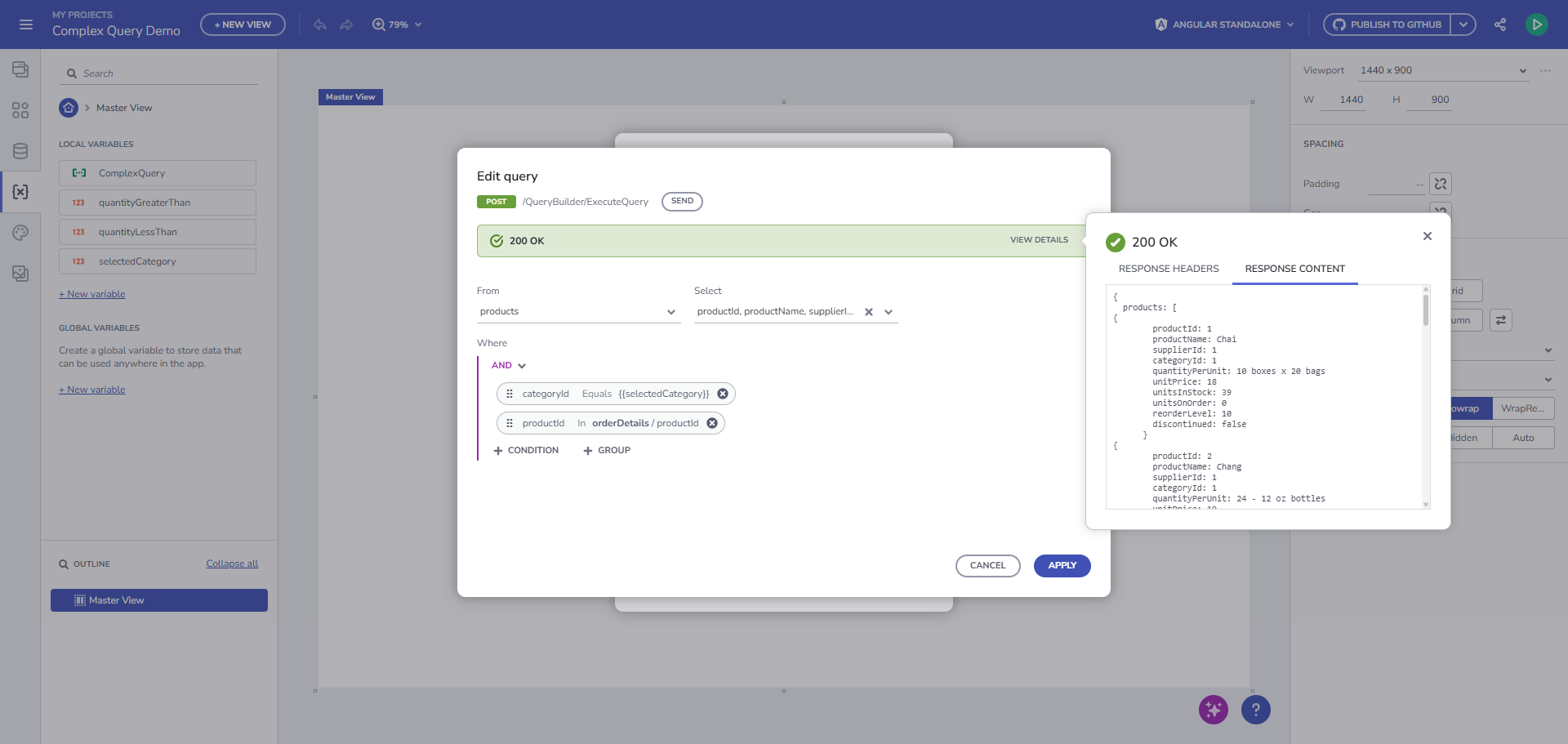
View query execution test
Why It Matters
App Builder’s Query Builder eliminates the need for manual query syntax. Instead, it uses a structured, drag-and-drop interface that mirrors your data schema — helping both developers and designers refine datasets for their views quickly and accurately.
Typical Use Case
A common use case is filtering products based on category and price range.
For example, you can build a query that retrieves all Products belonging to a selected Category (chosen from a Select component listing all available categories), and filters them by a unit price range defined by two numeric input fields.
The corresponding SQL representation would look like this:
SELECT * FROM products
WHERE categoryId IN (
  SELECT categoryId
  FROM categories
  WHERE categoryId = {{SelectedCategory}}
)
AND productId IN (
  SELECT productId
  FROM orderDetails
  WHERE unitPrice >= {{UPFrom}}
  AND unitPrice <= {{UPTo}}
)
In App Builder, this logic can be created visually — connecting the SelectedCategory, UPFrom, and UPTo inputs as dynamic filters. When users interact with these components, the Query Builder updates the data view in real time, showing only the products that match the current selection.
Additional Resources
- Query Builder Step-by-Step Guide
- Query Builder Support for API Projects
- App Builder Components
- App Builder Interface Overview
- Form Builder
- Grid Remote Paging
- Crud Operations
- Remote Data Operations
 GitHub


